Metadata Handling
Within a Project, there are two types of metadata:
Project-level Metadata: Configured at Project level and applies to each session (Subject ID/Session ID)
File-level Metadata: Applies to files within a session
This section covers programmatic modification of metadata in the active Project.
Begin by logging in and activating a Project (see Logging In and Activating a QMENTA Project).
Project-level Metadata
Retrieve Project-level metadata:
p_metadata = project.metadata_parameters
p_metadata is a dictionary where each key is a metadata field with
these sub-keys:
title: Parameter titleid: Identification code (matchesPROJECTMETADATAKEYin Advanced Search)type: Parameter typevisible: Visibility in QMENTA Platformreadonly: Editability statusmandatory: Required statusdescription: Parameter descriptionoptions: Allowed values for single/multiple-option typesorder: Display order in QMENTA Platform
Example output:
{
    'gender': {
        'title': 'Gender',
        'id': 'gender',
        'type': 'single_option',
        'visible': 1,
        'readonly': 1,
        'mandatory': 0,
        'description': '',
        'options': [
            {'value': 'male', 'label': 'M'},
            {'value': 'female', 'label': 'F'},
            {'value': 'unknown', 'label': 'UN'}
        ],
        'order': 1
    }
}
Note
New Projects start without configurable Project-level metadata parameters. These can only be configured via the QMENTA Platform.
All Projects include these default metadata parameters:
age_at_scan: Subject age at acquisitiondate_at_scan: Acquisition dateqa_status: Session QC statusqa_comments: Session QC comments
For DICOM data, age_at_scan and date_at_scan are auto-populated
during upload.
Retrieve session metadata:
subject_name = "0001"
subjects = [subject for subject in project.subjects_metadata
           if subject["patient_secret_name"] == subject_name]
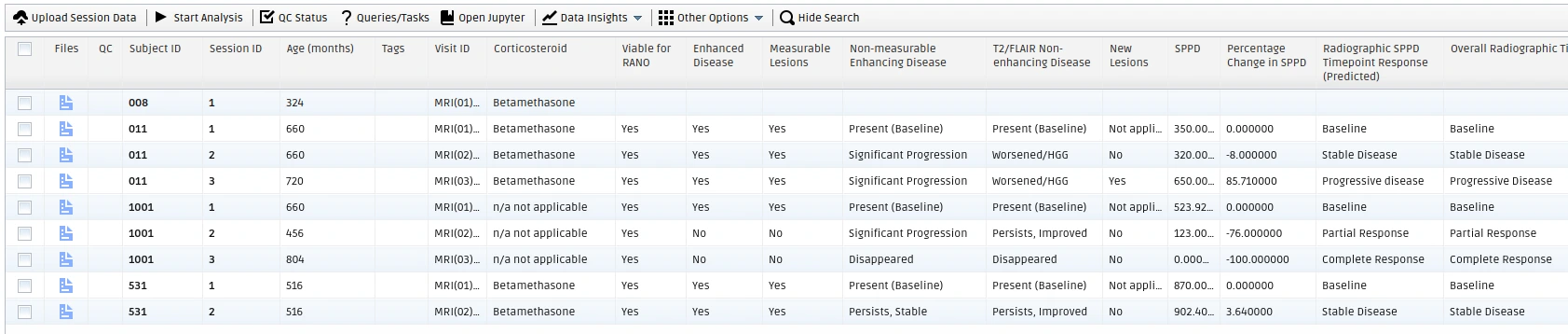
Each session dictionary contains Project-level metadata like:
age_at_scandate_at_scanmd_gender(notemd_prefix is auto-added)qa_statusqa_comments
View all session info:
print(subjects[0])
Project-level Metadata Modification
Modify Project-level parameters:
subject_name = "0001"
ssid = "1"

session = [subject for subject in project.subjects_metadata
          if subject["patient_secret_name"] == subject_name
          and subject["ssid"] == ssid]
patient_id = session[0]["_id"]
age_at_scan = session[0]["age_at_scan"]

tags = list(set(subject["tags"] + ["new tag"]))  # Add tag
metadata = {"gender":"male"}  # Update gender

project.change_subject_metadata(
    patient_id,
    subject_name,
    ssid,
    tags,
    age_at_scan,
    metadata
)
Note
All metadata except patient_id can be modified.
File-level Metadata
Access file metadata via Container ID:
subject_name = "0001"
ssid = "1"
container_id = project.get_subject_container_id(subject_name, ssid)
files_metadata = project.list_container_files_metadata(container_id)
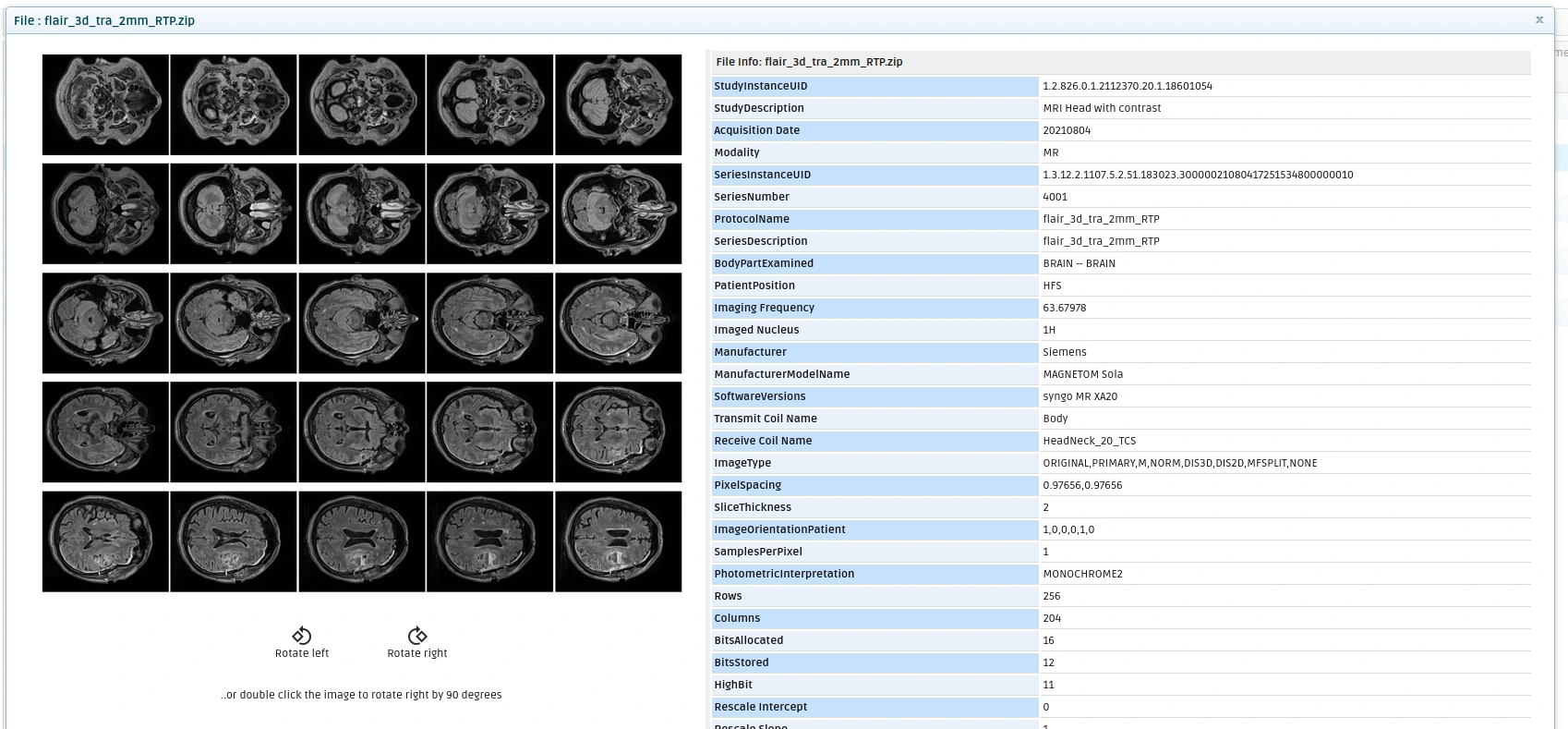
Each file’s metadata dictionary contains:
name: File namesize: File size (bytes)tags: Associated tagsmetadata: Additional file info
Note
DICOM Series are stored in ZIP files. Metadata extraction depends on file type - DICOM has extensive metadata while NIfTI/PNG have minimal.
View file metadata:
print(f"File Name: {files_metadata[0]['name']}")
print(f"File Tags: {files_metadata[0]['tags']}")
print(f"File Modality: {files_metadata[0]['metadata']['modality']}")
print(f"File Metadata: \n\n{files_metadata[0]['metadata']['info']}")
File-level Metadata Modification
Only File Modality and Tags can be modified:
new_modality = "DWI"
new_tags = files_metadata[0]['tags'] + ["modified"]
project.change_file_metadata(
    container_id,
    files_metadata[0]['name'],
    new_modality,
    new_tags
)
Quality Check (QC) Status
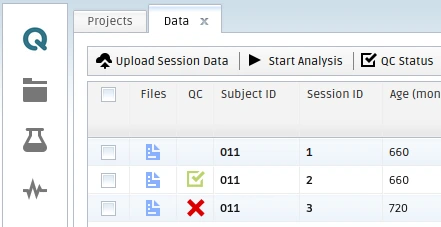
QC Status ensures data quality for:
Protocol adherence
Image quality
Read and modify QC metadata:
from qmenta.client.Project import QCStatus

qc_status, qc_comments = project.get_qc_status_subject(
    subject_name=subject_name,
    ssid=ssid
)

patient_id = project.get_subject_id(subject_name, ssid)
qc_comments = "Images meet quality standards."
qc_status = QCStatus.PASS
project.set_qc_status_subject(patient_id, qc_status, qc_comments)
QCStatus values:
- PASS
- FAIL
- UNDETERMINED
Protocol Adherence Automation Analysis
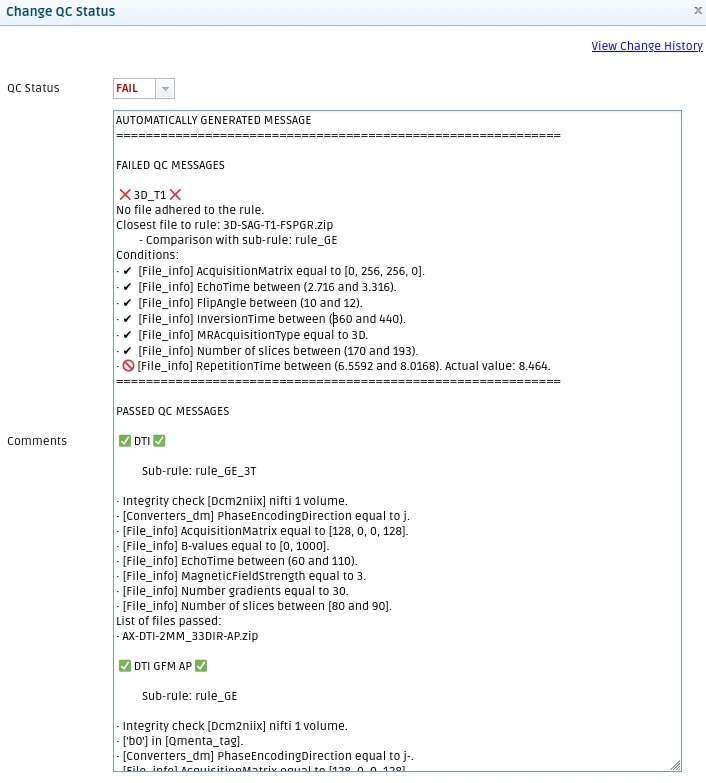
This analysis compares session data against predefined rules to identify protocol deviations. Example rules for ADNI 4 protocol: ADNI4 rules
Execution updates QC Status automatically:
analysis_id = project.start_analysis(
    script_name='qmenta_protocol_adherence_automation',
    version='1.9',
    settings={"input":container_id},
    analysis_name="Protocol Adherence Automation (v.1.9)",
)
Protocol Adherence Rules
Get current Project rules:
description = project.get_project_pa_rules("Rules.json")
Set modified rules:
project.set_project_pa_rules("Rules.json", description)
Note
Rules are Project-specific.
Next Steps
Analyses Execution – Execute analyses
Results Handling – Retrieve analysis outputs